
Why Is My UniUni Tracking Not Updating? Fixes & Timeline (2026 Guide)

You refresh the page for the tenth time today, your heart sinking as your UniUni tracking still shows no movement. “Why is my UniUni tracking not updating?” You are not alone. It’s a question echoed by thousands of online shoppers every week, especially those ordering from Temu, AliExpress, Shein, or YesStyle.
That frozen status screen can trigger instant stress: Is my package lost? Did something go wrong? Will it ever arrive?
The good news? In most cases, a non-updating UniUni tracking number is completely normal and fixable. This guide simplifies the real reasons behind the silence, gives you clear timelines based on actual shipping stages, and shares practical, step-by-step fixes that work in 2026.
By the end, you’ll know exactly when to relax, when to act, and how to get your package back on track, often without even picking up the phone.
Common Reasons Why UniUni Tracking Is Not Updating
UniUni tracking can go quiet for several legitimate reasons. Understanding which stage your package is in helps separate normal delays from real problems.
Pre-Handover Stage (Seller/Vendor Processing)
This is by far the most common reason for tracking not updating. When you first get your tracking number, the seller has usually only created the shipping label. The package hasn’t physically reached UniUni yet. During this phase, UniUni’s system has very limited information, so the status stays frozen, sometimes for days.
Official UniUni support confirms: “If there are no updates on your tracking number, it likely means the vendor is still processing your order.” Many shoppers on Reddit report their tracking sitting on “Order Received” or “Label Created” for 3–7 days before any movement.
Pro tip: Contact the seller (via the marketplace) first if it’s been over 5–7 days with zero progress.
Post-Handover Scanning Delays
Once the seller hands the package to UniUni, scanning delays are very common. The parcel might be moving between warehouses or facilities, but the drivers or sorting centers haven’t scanned it yet.
These gaps typically last 24–72 hours. During busy periods or handoffs between international and local carriers, the tracking can stay silent even while the package is physically progressing. This creates that frustrating feeling where “something should be happening” but nothing shows up.
Last-Mile Delivery Issues (“Out for Delivery” Stuck)
Seeing “Out for Delivery” but getting no updates for multiple days is one of the biggest pain points. Gig-economy drivers often scan the package as out for delivery early in their route. If they don’t reach your address by the end of the shift, the status can stay stuck overnight or even longer, especially in rural areas, apartments, or during peak seasons.
Real user experience (Reddit): “Out for delivery for 5 days now…” is a frequent complaint, yet many packages eventually arrive with little additional tracking.
Other Frequent Causes (Peak Seasons, Rural Areas, System Glitches)
These factors combined explain why thousands of people search for “uniuni tracking stuck” or “uniuni tracking delayed” every month.
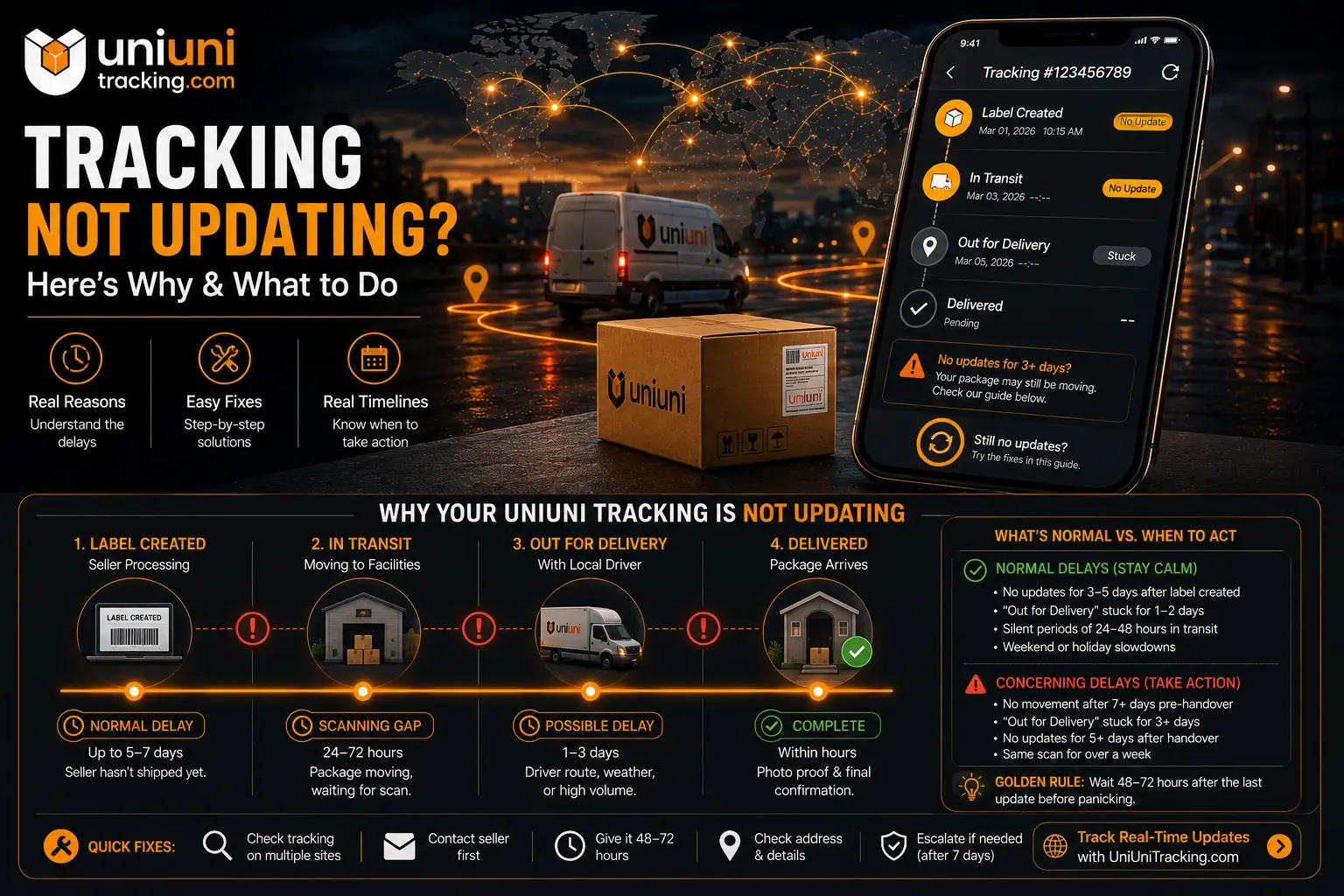
Realistic UniUni Tracking Update Timeline
One of the biggest frustrations with UniUni is the lack of consistent updates. Knowing the typical timeline for each stage helps you stay calm and know when it’s time to take action.
Expected Update Timeline by Shipping Stage
Shipping Stage | Typical Time to First Update | Normal Silence Period | What It Means |
|---|---|---|---|
Pre-Handover (Label Created) | 0–7 days | Up to 5–7 days | Seller still processing |
Handover to UniUni | 1–3 days | 24–72 hours | Package received by carrier |
In Transit / Warehouse Moves | 1–4 days | 24–48 hours between scans | Moving between facilities |
Out for Delivery | Same day or next | 1–3 days | Driver has the package |
Delivered | Within hours of attempt | — | Final status with photo proof |
Note: Timelines are longer during peak seasons, holidays, or in rural areas.
How Long Should You Wait Before Panicking?
Most tracking issues resolve on their own if you give them reasonable time. The golden rule many experienced shoppers follow: Wait 48–72 hours after the last update before worrying. For pre-handover packages, stretching to 5–7 days is normal.
Here’s a quick reference:
Normal Delays (Stay Calm):
Concerning Delays (Time to Act):
Remember, many packages arrive safely even with minimal tracking updates. UniUni drivers often prioritize delivery over constant scanning.
Step-by-Step Fixes When Your UniUni Tracking Is Stuck
Don’t just refresh endlessly. Here’s a proven 8-step action plan that helps get most packages moving again.
Quick Wins You Can Do Right Now
- Double-check your tracking number — Copy it carefully and try it on the official UniUni site plus alternative trackers like https://uniunitracking.com/.
- Wait 24 hours and check again — Many “stuck” statuses magically update overnight.
- Contact the seller first — Especially if it’s still in pre-handover. Marketplaces like Temu or AliExpress can often nudge the process.
- Update your delivery instructions — Add gate codes, buzz numbers, or safe drop instructions through the seller or UniUni portal.
Updating Delivery Information
Wrong or incomplete address details are a top reason for stalled “Out for Delivery” statuses. Log into your marketplace account or use UniUni’s support chatbot to update the following:
Doing this early can prevent failed delivery attempts that reset the timeline.
Contacting the Seller vs UniUni Support
Pro move: When reaching out, be polite but specific. Include your tracking number, order number, last known status, and screenshots. Ask for an ETA and photo proof policy reference.
When to Escalate? – Contacting UniUni Support
You’ve waited patiently and tried the basic fixes, but your tracking is still not updating. At this point, it’s time to escalate.
Best Ways to Reach UniUni Customer Service
Chatbot (Fastest Starting Point)
Go to uniuni.com/support and start with the chatbot. It can provide an ETA and, if your parcel is overdue, automatically help create a support ticket.
Submit a Support Ticket
Use the form on the same support page. This is the most reliable method for detailed issues like delayed packages or address updates.
Phone Support
Support hours are generally Mon–Sat, 10 AM – 9 PM EST.
Tip: Many users find the chatbot + ticket combination more effective than phone calls, which can have long wait times.
What to Say in Your Ticket/Chat for Fast Results?
Be clear, calm, and specific. Support teams handle hundreds of requests daily.
Effective Template:
Polite but firm language works best. Mention if it’s a time-sensitive item (gift, medicine, etc.) when appropriate. Users report much better responses when they provide all details upfront.
Signs Your Package Might Actually Be Lost
While rare, it does happen. Watch for these red flags:
If you see multiple red flags, escalate immediately and consider opening a claim through the seller/marketplace.
Prevention Tips – Avoid Tracking Issues on Future Orders
The best way to reduce tracking stuck headaches is to prevent them before they start. Here are proven strategies:
Small actions at the ordering stage can save you days of stress later.
Common Questions
Conclusion
Dealing with UniUni package tracking not updating issues is stressful, but it’s usually just part of the normal shipping process rather than a sign of real trouble. By understanding the common reasons, respecting realistic timelines, and following the step-by-step fixes in this guide, you’re now much better equipped to handle these situations calmly and effectively.
The key takeaways: Stay patient for the first 48–72 hours, use multiple trackers, contact the seller first for early issues, and escalate to UniUni support with clear details when needed. Most packages arrive safely, even with patchy tracking.