
What Does “Out for Delivery” Mean on UniUni Tracking? (And Why It Sometimes Takes Days)

You’ve been refreshing your tracking page all day, heart racing with excitement. Your package from AliExpress, Temu, or Shein finally shows “Out for Delivery” on UniUni Tracking. But as hours turn into a full day, or even multiple days, that excitement slowly turns into worry.
“UniUni out for delivery” is one of the most common (and confusing) statuses for online shoppers across the US and Canada. Many people wonder if their package is actually on the way or stuck somewhere.
In this article, you’ll learn exactly what this status means, why it can linger for days, realistic timelines, and, most importantly, what practical steps you can take to get your package faster. Whether you’re a first-time UniUni user or a seasoned online shopper tired of the uncertainty, this post will help you feel more in control.
Let’s break it down step by step.
What Does “Out for Delivery” Actually Mean on UniUni?
“Out for Delivery” on UniUni tracking means your package has left the local warehouse or sorting facility and is loaded onto a delivery driver’s vehicle. In ideal conditions, it signals that the driver is actively working on their route and your package should arrive the same day.
The status typically appears after the package is scanned as handed over to the last-mile driver. You’ll often see it in your UniUni tracking updates alongside a timestamp.
However, the real-world experience with UniUni can differ significantly from the ideal scenario. While some packages are delivered within hours of this status, many customers report seeing “uniuni out for delivery” for 1–3 days (or longer) before movement. This happens because UniUni uses a large network of independent drivers who may carry dozens of packages per route.
It doesn’t always mean a driver is currently heading straight to your door; sometimes it means the package is in the delivery pool for that day or the next.
The UniUni Delivery Process: From Warehouse to Your Doorstep
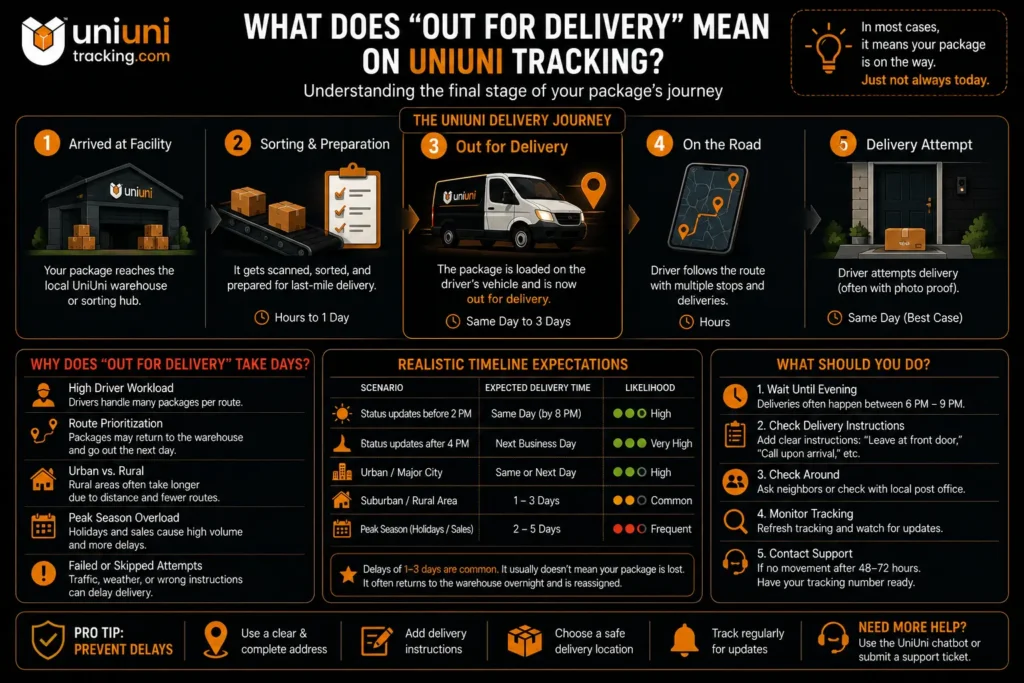
Understanding the full journey helps explain where “uniuni out for delivery” fits and why it sometimes feels delayed. Here’s how UniUni typically moves your package from the warehouse to your front door:
- Arrival at Local Facility: Your package reaches UniUni’s regional warehouse or sorting hub after international shipping.
- Sorting and Preparation: It gets scanned, sorted, and prepared for last-mile delivery. This stage can take several hours to a day.
- Assigned to Driver: The package is loaded onto a delivery driver’s vehicle. This is usually when the status changes to “Out for Delivery.”
- On the Road: The driver follows their daily route with multiple packages.
- Delivery Attempt: The driver tries to deliver it to your address (often with photo proof).
“Out for Delivery” is the key transition point between the warehouse and actual delivery. It means your package has officially left the facility and is now in the hands of a local driver. In the best cases, this leads to same-day delivery. However, because UniUni relies on a network of independent contractors, the process isn’t always as fast as you’d hope.
Why Is My UniUni Package Stuck on “Out for Delivery” for Days?
It’s incredibly frustrating to see “uniuni out for delivery” on your tracking for multiple days with no update or arrival. This is one of the most common complaints from UniUni users.
Here are the most frequent reasons this happens:
Many real users on Reddit and forums report seeing this status for 2–5 days before any movement. While not ideal, it’s often a symptom of last-mile logistics challenges rather than your specific package being lost.
How Long Should “Out for Delivery” Take with UniUni?
When your tracking shows “uniuni out for delivery,” the big question is always: How long until it actually arrives?
In ideal situations, UniUni aims to deliver the same day the status updates. However, real-world results vary significantly depending on your location, the time of day the status changes, and how busy the driver is.
Here’s a realistic timeline based on thousands of user reports:
Scenario | Expected Delivery Time | Likelihood |
|---|---|---|
Status updates before 2 PM | Same day (by 8 PM) | High |
Status updates after 4 PM | Next business day | Very High |
Urban / Major City | Same or next day | High |
Suburban / Rural Area | 1–3 days | Common |
Peak Season (Holidays/Sales) | 2–5 days | Frequent |
When your package is out for delivery for days, it usually doesn’t mean your package is lost. It often means the driver couldn’t reach your address on the first attempt, returned it to the warehouse at the end of their shift, and it’s been reassigned for the next day (or the day after). This is very common with UniUni’s last-mile model.
What Should You Do When UniUni Says “Out for Delivery” But Nothing Arrives?
Seeing “uniuni out for delivery” with no sign of your package is stressful. Here’s exactly what you should do, step by step:
Prevention Tips: Always leave detailed delivery instructions when ordering. For important packages, consider using a pickup point or delivery to work if possible.
When to Contact Support: If the status has been “Out for Delivery” for more than 3 days with zero updates, it’s time to reach out. Have your tracking number ready and politely ask for the current driver status or a re-delivery request.
“Out for Delivery” vs. Other UniUni Tracking Statuses
Understanding how “uniuni out for delivery” compares to other statuses helps reduce confusion while tracking your package. Here’s a clear comparison of the most common UniUni tracking statuses:
Status | Meaning | What Usually Happens Next | Typical Timeframe |
|---|---|---|---|
Out for Delivery | Package is with the driver for delivery | Delivery attempt same or next day | Same day to 3 days |
Delivered | Package successfully handed over | You receive it | Immediate |
Delivery Attempted | Driver tried but couldn’t deliver | Package returned to warehouse | Same day |
In Transit | Package moving between facilities | Heading to local warehouse | 1–5 days |
Arrival Scan | Package reached local UniUni facility | Preparing for driver assignment | Hours to 1 day |
Exception | Issue occurred (wrong address, etc.) | Needs resolution | Varies |
“Out for Delivery” is one of the final stages; it’s much closer to completion than “In Transit” or “Arrival Scan.” However, unlike “Delivered,” it still depends on the driver successfully reaching your address that day.
Related terms you might see:
Real User Experiences with UniUni “Out for Delivery”
Real experiences with the “uniuni out for delivery” status are mixed. While some shoppers get their packages quickly, many face delays that cause frustration.
Positive Experiences:
Some users report smooth deliveries. “My package showed ‘Out for Delivery’ at 11 AM and arrived by 4 PM the same day. Super fast in the city!” shared one buyer from Toronto. Urban customers, especially those who left clear delivery instructions, often see good results.
Negative Experiences:
Many others express disappointment. A common complaint on forums: “It’s been ‘Out for Delivery’ for 4 days straight, and nothing has moved. This is ridiculous.” Another user mentioned, “UniUni tracking said out for delivery, but I was home all day; no knock, no package. Then it went back to the warehouse.”
These mixed reviews highlight that UniUni tracking works well when volume is normal and you’re in a good delivery zone, but it can be unreliable during busy periods or in harder-to-reach areas.
Overall, patience and proactive communication tend to improve outcomes.
Frequently Asked Questions
In conclusion
“Out for Delivery” on UniUni tracking is generally a positive sign; it means your package is in the final leg of its journey. While delays of 1–3 days are unfortunately common due to last-mile challenges, understanding the process and taking proactive steps can significantly reduce your stress.
Key takeaways: Stay patient until evening, add detailed delivery instructions, and don’t hesitate to reach out to support when needed. Most packages do arrive, even if the tracking feels slow.
Ready to check your package status? Use our UniUni Tracking Tool for the fastest updates.