

UniUni Chatbot Guide: How to Get Real Human Help Fast (Even When the Bot Fails)

You’ve been staring at your UniUni tracking for days. It says “Out for Delivery” or “We attempted delivery,” but your doorbell never rang, and your package is nowhere in sight. Sound familiar? You’re not alone; thousands of Shein, Temu, and AliExpress shoppers hit the same wall every week with the UniUni chatbot.
The UniUni chatbot is the virtual assistant you’ll first meet on their support page. It’s designed to handle simple tasks like giving you an ETA, checking basic status, or helping generate a support ticket for overdue parcels. It’s quick and always available, but it often feels like it’s reading from a limited script.
In this detailed blog post, you’ll learn exactly how to use it more effectively, the magic phrases that get better results, and most importantly, when and how to escalate to real human help fast. We’ll walk you through the full journey: chatbot → smart support ticket → phone escalation. By the end, you’ll know how to cut through the frustration and actually move your package forward.
Why Does the UniUni Chatbot Often Feel Frustrating?
Let’s be honest: using the UniUni chatbot can feel incredibly circular and unhelpful. You type in your tracking number hoping for clear answers, only to get generic responses, repeated suggestions to “wait 24-48 hours,” or an invitation to submit yet another ticket that goes nowhere.
Many users report the bot excels at basic info like estimated arrival times but quickly hits its limits with real problems, failed delivery attempts, missing packages, wrong addresses, or “delivered but not received” situations. It can’t make decisions, update complex instructions reliably, or connect you directly to a person when needed.
This creates a perfect storm of anxiety and helplessness, especially when you’re waiting on an important order. The frustration builds fast when it feels like the system is designed to delay rather than resolve.
Does UniUni Have Real Live Chat?
No, UniUni does not currently offer true live chat with human agents. What exists is an automated UniUni chatbot (virtual assistant) on their support page. It handles simple queries and can guide you to create a support ticket, but it is not a real-time conversation with a customer service representative.
Their main support channels remain the chatbot, online ticket system, and phone numbers. Many users searching for UniUni live chat end up disappointed when they realize the chatbot is the only instant option available.
Real User Experiences with UniUni Chatbot
Real feedback from frustrated customers paints a consistent picture:
These experiences highlight a common theme: the UniUni chatbot works for very basic status checks but leaves most people needing more help feeling stuck in a loop.
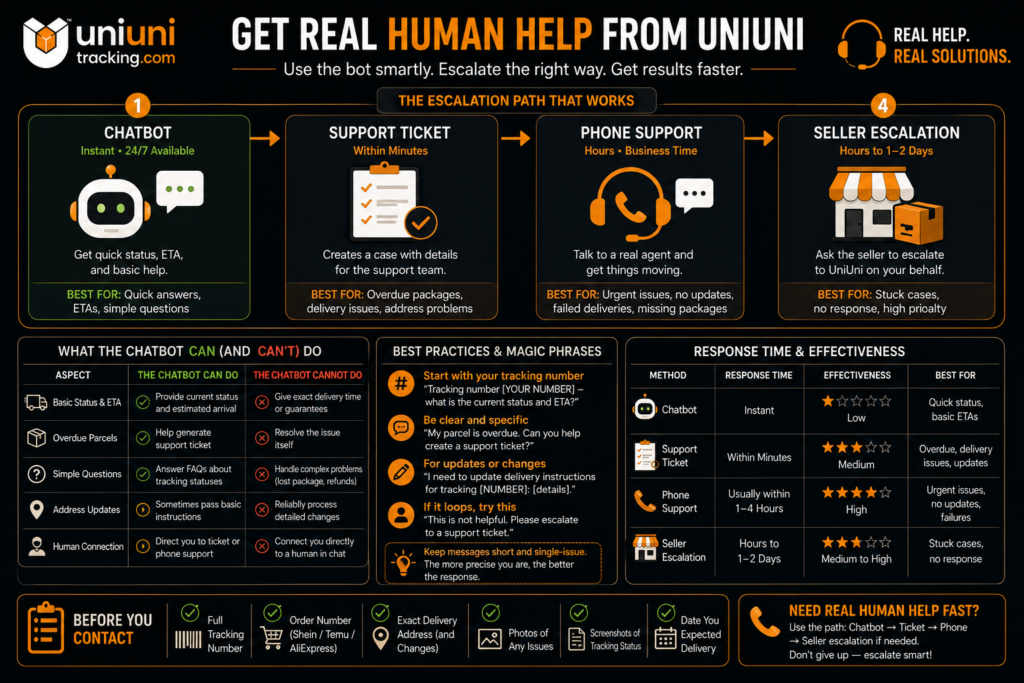
How to Use the UniUni Chatbot Effectively? (Step-by-Step)
The good news? You can get better results from the UniUni chatbot if you approach it the right way. It’s not perfect, but treating it like a limited but useful tool, instead of expecting full customer service, makes a noticeable difference. Here’s exactly how to use it step by step.
Step 1: Accessing the UniUni Chatbot
The chatbot is available 24/7 and responds instantly. Have your tracking number ready before you open it.
Step 2: Best Practices & Magic Phrases That Work Better
To get clearer answers, be direct and specific. Here are proven approaches that many users find more effective:
Pro tip: Keep your messages short and single-issue. The more precise you are, the fewer generic replies you’ll get.
What Information to Prepare Before Starting? (Checklist)
Before opening the chatbot, gather these details to avoid back-and-forth:
Having everything ready helps the chatbot process your request faster and creates stronger support tickets when needed.
What the UniUni Chatbot Can Actually Help With?
Aspect | What the Chatbot Can Do | What It Cannot Do / Limitations |
|---|---|---|
Basic Status & ETA | Provide current status and estimated arrival | Give exact delivery time or guarantees |
Overdue Parcels | Help generate support ticket | Resolve the issue itself |
Simple Questions | Answer FAQs about tracking statuses | Handle complex problems (lost package, refunds) |
Address Updates | Sometimes pass basic instructions | Reliably process detailed changes |
Human Connection | Direct you to ticket system | Transfer to live agent |
The chatbot works best as a starting point for simple information and ticket creation. For anything more serious, you’ll need to escalate.
When to Skip the Chatbot and Escalate Immediately?
Don’t waste time looping with the bot if you see these red flags:
In these cases, move straight to creating a detailed support ticket and prepare to follow up by phone. The chatbot is great for quick ETAs, but real problems need human attention.
How to Get Real Human Help from UniUni Support?
When the chatbot hits its limits, it’s time to escalate strategically. The key is being prepared, detailed, and persistent. Here’s the most effective path to reach actual human support.
Creating an Effective Support Ticket
The support ticket system is your strongest channel for most issues. Here’s how to make yours stand out:
Tip: Be polite but firm. Write as if explaining to a real person who can fix it. Tickets generally get a response within 24-48 hours, though it can take longer during busy periods.
UniUni Phone Support – Numbers, Best Times & Tips
Phone support remains the fastest way to speak with a real person for urgent issues.
Current Phone Numbers (as of 2026):
Best Times to Call:
Support hours are generally 10:00 AM – 9:00 PM EST, Monday to Saturday. Call early in the morning (right after 10 AM) or mid-week for shorter wait times. Avoid Mondays and evenings if possible.
Phone Tips: Have your tracking number ready, stay calm, and clearly state the problem + desired outcome. If the first agent can’t help, politely ask to speak with a supervisor.
Smart Escalation Path
Follow this proven escalation sequence for best results:
This layered approach usually breaks through the delays.
Pro Tips to Speed Up Your Resolution
Here are battle-tested hacks that actually help:
Common UniUni Chatbot Scenarios & Quick Fixes
Scenario 1: “Out for Delivery” but nothing arrived.
The chatbot will usually say “wait 24-48 hours.” Skip straight to a support ticket requesting investigation + re-delivery. Call if it’s been more than 2 days. Take a photo of your empty porch as proof.
Scenario 2: Want to change address/delivery instructions.
Submit a support ticket immediately with the new details (gate code, unit number, safe place, etc.). Phone confirmation helps. Do this as early as possible.
Scenario 3: Package marked delivered but missing.
This is one of the most common complaints. Submit a ticket under “Lost Parcel” or “Complaint (Delivery)” right away with timestamped photos. Many users report success when they also contact the seller for a claim.
UniUni Support Options Compared
Channel | Speed | Best For | Success Rate (User-reported) |
|---|---|---|---|
UniUni Chatbot | Instant | Quick ETA, basic status, ticket starter | Low to Medium |
Support Ticket | 24-72 hours (often longer) | Detailed complaints, address changes, lost packages | Medium |
Phone Support | 10-180 minutes wait | Urgent issues, real-time resolution | Medium to High (if you get through) |
Contact Seller (Shein/Temu/etc.) | Varies (often fast) | Refunds, re-shipment pressure | High |
Escalation (BBB, Social, Credit Card) | Days to weeks | Unresolved cases after 7+ days | Medium (adds strong pressure) |
This table helps you choose the right channel based on your situation and urgency.
Frequently Asked Questions
Endnote
Dealing with the UniUni chatbot can be frustrating, but you now have a clear roadmap: start smart with the bot for quick ETAs, move to a well-documented support ticket, and escalate to phone or the seller when needed. Persistence and good evidence (photos, screenshots, tracking history) are your best tools.
The most successful users combine multiple channels and stay organized. Don’t wait passively; take action early.