
UniUni Package Tracking Guide: Everything Your Tracking Number Is Telling You
You’ve got a tracking number, and it doesn’t look like anything you’ve seen before. It’s not a USPS number, not a UPS number, not even close — it starts with letters like “UUS” or “UNIA,” and whatever page you land on when you paste it in either shows you real information or leaves you more confused than before. This guide exists to fix that: what UniUni tracking numbers actually look like, what every status on that page actually means, and exactly what to do when tracking stalls, stalls again, or claims your package is somewhere it clearly isn’t.
What Is UniUni Tracking?
UniUni tracking is the shipment-monitoring system for UniUni (legally Uni Express Inc.), a Canada-headquartered last-mile delivery company that handles the final leg of delivery for a huge volume of e-commerce orders — most commonly from Temu, Shein, AliExpress, TikTok Shop, YesStyle, and individual eBay sellers. If you’ve never heard of UniUni before finding this page, that’s normal: the platform you ordered from almost never announces which last-mile carrier is handling your specific order, so the tracking number is often the first and only place UniUni’s name shows up at all.
Once your package enters UniUni’s network — typically after arriving in North America from an overseas fulfillment center, or after being handed off from another domestic carrier — UniUni’s system takes over tracking and delivery, and every scan from that point forward shows up under your UniUni tracking number rather than whatever number the original carrier used.
UniUni Tracking Number Formats, Explained
This is the part most tracking guides get wrong or oversimplify, so here’s the actual breakdown.
The most common format: UUS + digits. The large majority of UniUni tracking numbers start with the three letters “UUS,” followed by a string of digits — typically bringing the whole number to somewhere between 16 and 19 characters total. Example: UUS6181780830420033. This is what you’ll see on most Temu and AliExpress orders.
The second most common format: UNIA + digits. Some shipments, especially certain cross-border and consolidated freight routes, use “UNIA” as the prefix instead, typically followed by 9 digits and sometimes ending in a two-letter suffix like “YQ.” Example: UNIA123456789YQ. This shows up more often on YesStyle orders and some Etsy cross-border shipments.
Less common formats you might still encounter: UniUni’s network also handles a handful of rarer prefixes, mostly tied to specific cross-border or consolidated freight arrangements: “AS” or “AQ” followed by 8 digits and ending in “CN” (used on some China-origin cross-border parcels), “JY” followed by 15 digits, “U00” followed by 12 digits, “MB” followed by 12 digits, “UNPB” followed by 10 digits, “JD” followed by 12 digits, and “BAUNI” followed by 10 digits. If your number doesn’t match the UUS or UNIA pattern but still doesn’t look like a USPS, UPS, or FedEx number, there’s a reasonable chance it’s still a UniUni shipment using one of these less common formats — try it in the tracking tool above before assuming it’s unrelated.
About “UUSC” and “UU” specifically: these show up constantly in search because people type them expecting a distinct format, but they’re best understood as shorthand rather than a separate official prefix — “UU” is simply how people abbreviate “UUS” or “UniUni” when searching, and “UUSC” typically appears in discussion of Canada-bound cross-border UUS-prefixed shipments rather than as its own numbering scheme. If you’re searching “UU tracking number” or “UUSC tracking,” you’re looking for the same UUS-prefix system described above.
A quick note if you’re seeing this instead of “UniUni”: some people encounter the brand name typed as two words — “uni uni tracking” or just “uni tracking” — usually because that’s genuinely how the name reads on a label or a confirmation email. All of these point to the same company; “uni” by itself, without “tracking” or “delivery” attached, is unrelated and usually refers to something like a university portal.
How to Track a UniUni Package?

Find your tracking number.
Check your order confirmation email or text from the seller first — look for a field labeled “Tracking Number,” “Carrier Tracking,” or occasionally just a long alphanumeric code with no label at all. If you ordered through a marketplace app (Temu, AliExpress, Shein), open the order details page directly; the tracking number is usually under a “Logistics” or “Shipping” section, and it may not appear until the seller has actually shipped the item.
Enter it into a tracking tool.
Use the tool at the top of this page, or UniUni’s own tracking page directly, which accepts up to 25 tracking numbers at once if you’re tracking multiple packages.
Read the status, not just the location.
The city or facility name shown is often less useful than the status label next to it — see the full breakdown below for what each one actually means.
If part of a multi-item order shows up while another part doesn’t, check your order history for a second, separate tracking number — sellers frequently split a single order into multiple packages that move on completely independent timelines, even though you paid for everything in one transaction.
Every UniUni Tracking Status, Translated
Status | What it actually means | Should you worry? |
|---|---|---|
Order Received / Label Created | UniUni has received shipping information but hasn’t physically scanned the package yet | No — this can sit for a day or two before physical movement begins |
Gateway Transit In | Package has arrived at a UniUni interfacility sorting hub | No — normal step |
Interfacility Transited | Package is physically in transit between two hubs | No, even if it lasts several days — this is often the longest-looking gap in the whole timeline |
Gateway Transit Out | Package has left a hub, headed to the next stop or to final delivery | No — normal step |
Out for Delivery | A driver currently has the package and is on an active route | No — can still mean anywhere from 1 to 10+ hours before arrival, especially since UniUni often delivers into the evening |
Sorry We Missed You | A delivery attempt was made and failed | Somewhat — check for a door notice and any redelivery instructions; a second attempt typically follows within about 48 hours |
Delivered | A scan (usually with a photo) was logged at the delivery address | Only if the photo doesn’t match where you’d expect it, or nothing is actually there — see below |
Returned to Warehouse / In Storage | Two delivery attempts have failed and the package is being held | Yes — this is the stage that requires you to act, see below |
When Tracking Stops Updating
A status that hasn’t changed in a day or two is rarely a sign anything is wrong — packages frequently sit in a batch waiting for their next scan event, and that wait stretches further over weekends and around statutory holidays when fewer trucks are moving between hubs. It becomes genuinely worth investigating once a status hasn’t changed in five or more days, since that’s well outside the normal range for any single leg of the journey.
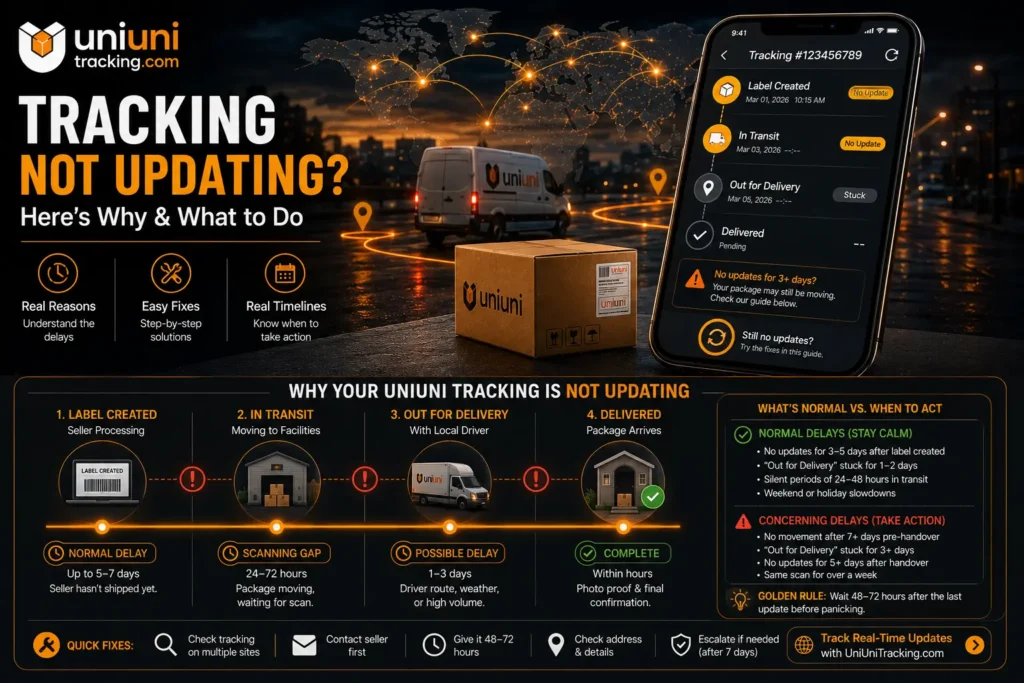
If you hit that point, the fastest path is UniUni’s own support chatbot (see the customer service section below) with your tracking number ready — not a phone call, since UniUni currently doesn’t publish a customer service phone number.
Delivered, But Nothing’s There
This is the single most common frustrated search related to UniUni tracking, and it’s worth taking seriously without assuming the worst immediately. Because UniUni’s driver network is built on independent contractors rather than a centrally trained employee fleet, proof-of-delivery consistency varies more than it would with a traditional carrier — a “Delivered” scan sometimes reflects a package left somewhere other than where you’d expect (a side door, a mailroom, with a neighbor) rather than an error or theft.
Before assuming anything’s gone wrong: check the delivery photo attached to the “Delivered” scan on UniUni’s tracking page, if one was captured — it often shows exactly where the package was left. Then check anywhere else a driver might reasonably leave a package at your specific address: a building’s mailroom or front desk, a porch around a corner, or with a neighbor. If none of that turns anything up, that’s when it’s time to open UniUni’s chatbot with your tracking number and delivery photo (or lack of one) ready.
What Happens After a Failed Delivery Attempt
If a first delivery attempt fails, UniUni’s process calls for a second attempt within about 48 hours — nothing needed from you unless your address or delivery instructions were wrong. If that second attempt also fails, the package is returned to a UniUni warehouse and its tracking status changes to reflect storage. From that point, it’s on you to contact support and arrange redelivery — the package won’t automatically retry a third time. UniUni holds packages in that storage state for up to 30 days before treating the delivery as abandoned and returning the package to the sender, so that 30-day window is the deadline that actually matters if your package ends up stuck at this stage.
Cross-Border Tracking: Why the History Sometimes Looks Strange
If your order shipped from an overseas fulfillment center, you may see tracking history that looks like it’s bouncing between unrelated systems: an international carrier’s scans, followed by a UniUni “Gateway Transit In” event, followed by ordinary domestic delivery scans. That’s the intended cross-border handoff working as designed, not an error — UniUni’s network includes dedicated cross-border and customs-handling capability (strengthened by its 2025 acquisition of Toronto-based logistics firm Shippie specifically for this purpose), and the handoff from an international carrier into UniUni’s domestic network is a normal part of how these routes work.
Customer Service: What to Do When Tracking Alone Doesn’t Resolve It
UniUni currently does not publish a customer service phone number, in the US or Canada — support runs exclusively through the chatbot on UniUni’s support page, a searchable FAQ, and the tracking portal itself. If you’ve encountered a phone number online claiming to be a verified UniUni support line, treat it as outdated; UniUni did publish regional phone lines for a period in 2025 and early 2026, but discontinued them by mid-2026 in favor of the chatbot-only model. Have your tracking number ready before starting a chat — it’s the first thing you’ll be asked for.
→ Full walkthrough of the chatbot process and how to escalate a stuck case: UniUni Customer Service
Frequently Asked Questions
→ Related: What Is UniUni? · UniUni Delivery Guide · Is UniUni Legit?